

If you have a blog or a website, you can chat with your readers using the new feature called Google Talk Chatback. To use Chatback, you need to have a Google Talk account, but your visitors or readers need not have it. They can chat with you without having any Google account.
A Google Talk chatback badge will let visitors to your web page chat with you. They’ll be able to chat with you whenever you’re signed in to Google Talk.
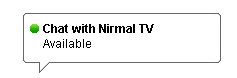
Chatback uses the web-based Google Talk Gadget so your visitors don’t need to download anything. It opens in a new window so they can keep chatting with you even if they browse to other pages.
You can also change your status and screen names in the Chatback. Click here to create a Chatback for your blog.




very nice tool…
This is cool. It gives a new level of interactivity to our blog.
This is good and everything but there is no way to configure this for google apps for your domain accounts..
Any ideas anyone?
This is good, but when i tried it, i realized that there were so many steps and clicking of links involved before starting the chat. i think the service of plugoo buddy is better where the chat is instant as well as you can configure their badge to work with different chat client , msn, yahoo etc..
anyways good move by google 😀
Google Talk Chatback is good. Earlier, I have tried similar google chatting client in my previous blog on blogspot. It works absolutely fine. Only thing is that the page takes a bit longer than usual to load.
I agree with Madhur. It does add another level of interactivity. This could be a good addition.
To configure this for you domain go to following URL:
http://google.com/talk/service/a/yourdomain.com/badge/New