

Whenever you create a new user account in Windows, it creates a lot of folders like “My Documents“, “My Music” etc. Most of the times when you save documents or download music or pictures, these are saved in these folders and all these data are stored in default drive of OS. In case Windows crashes and you need to re-install Windows, then you end up loosing all data.
In order to keep data safe, you can reorganize your Windows folders. Right click on My Documents and click properties. Select the target tab in properties. Type in the desired location where you want to reorgaize data. Here I have given as drive E:\Backup. Once you have enetered the path, click OK. It will ask whether you want to move all data to new location and chose Yes.
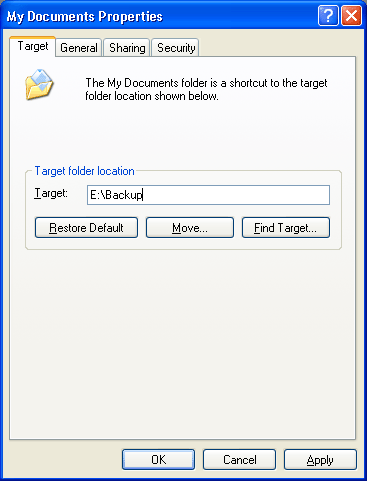
Now all the documents and files in My Documents would be moved to new location. Whenever you save any new documents to My Documents, then these will be saved on the new path hence keeping you data safe. This method can be used in Windows Vista as well.








Thats a simple useful tip. I have been manually copying every file to a similar folder these days. Like “E:/backup”. this tip should save sometime for me definitely.
when you save something after creating the backup folder will it save in both locations or it only saves in the new location?
For so many years, I have been working on WinXP but, it’s strange that I never tried this earlier. Infact, I didn’t know about it.
Thanks for sharing this simple yet useful information.
🙂
@ram
It saves only in the location you have chose.
@Smackall,
This saves times instead of copying manually.
@Ram,
As pointed out, it will save only in the new location.
@Rakshit,
There are tons of hidden tips, I’m just exploring a few. 🙂
Though I knew that the folder could be changed but never tried and thus never knew that it even moves existing files to other folder! Good to learn that. Thanks!
Elegant solution. I love it!