

If you are working with more than one Excel workbooks and you need to check the spelling of all the sheets, here is a simple step to check the spelling of multiple excel workbooks. Right click on any worksheet in the excel and check the “Select All Sheets” when the context menu appears.
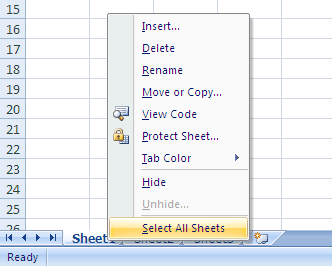
Once you have selected all sheets, press F7 to check the spelling of all the sheets.
Hope you liked this simple tip to check spelling. Watch out for more tricks on Office.








guess you are posting too many office tips…have a bunch 🙂
@Rajesh,
I have started using the new Office 2007, that why I’m getting lot of new tips on that. 🙂
Nice tip Nirmal. I never now that F7 is for spellchecks.
Nice tip Nirmal. Seems you are very fond of office 2007
🙂
Easy but very useful ….Good tip !
Nice tips Nirmal. Very soon am also going to use office 2007 🙂
Nice tips Nirmal. Very soon am also going to use office 2007