

Ribbon is one of the notable changes in Office 2007. Ribbon occupies lot of space on the top of all programs. Although the ribbon has lot of features built into it, sometimes it can be annoying to have too big header. For this the Ribbon can be turned off as well.

Ribbon in Office 2007
There are many ways to turn the Ribbon off.
1. Click the down arrow to the right of Quick access toolbar and then select minimize the Ribbon option.
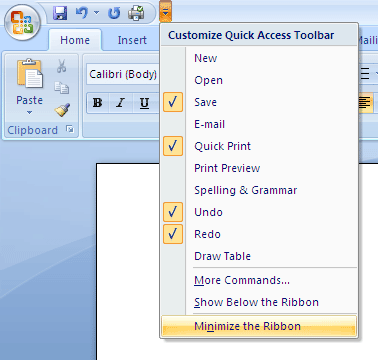
2. Second option is much simpler than the first one, all you need is to double click the current active tab on the ribbon. The ribbon disappears and double click again to get it back.
3. Press Ctrl+ F1 and ribbon becomes invisible. Clicking Ctrl+F1 again will make it active.
Hope you enjoyed reading this tip.








Nice tip Nirmal. Can we get the normal toolbar with this latest version of Office. Well, sometimes new users just doesn’t get along with new toolbars.
@syahid – getting used to it is a matter of time…better to get used rather than staying comfy with older versions…
@Syahid,
I agree with Rajesh. Its better to get comfortable with new version as these may become the new standard.
nirmaltv –
“I agree with Rajesh. Its better to get comfortable with new version as these may become the new standard.”
Yes. But will MSO 2007 become the new standard? More and more users are migrating away from desktop applications to web-based products.
Cheers,
Karl A. Shalek
http://www.fastercats.com
@Karl,
I feel MSO 2007 could become the future standard unless we have some stiff competition from Open source. Online applications may not be able to compete fully with desktop based as of now.
I don’t see why Microsoft would make changes like this – the old interface is the one that people are used to, and they are alienating their entire user base with this drastic change. Rather than having the software adapt to the user, they are forcing the user to adapt to the software.
@Apok – I can see what you’re saying, but MS isn’t alienating their entire user base… they are making their products better-looking and better-functioning. My friends, parents, and I all like the new UI very much, though we don’t dislike the old one. It’s not like we were clamoring for a change, and I myself would still be on OO.o if it had proper docx support and a decent Outlook alternative, ie a life-manager that synced with ActiveSync (a OneNote alternative wouldn’t be that bad either).
I’m sorry to say that if anyone has adapted to the ribbon feature, they could have not been using the former MS Office suite very long in my opinion. I am very peeved about the Ribbon feature in Office 2007 and the fact it will be in Windows 7.
The ribbon feature is so frustrating, I switched to Open Office. Based on this I do not believe that Microsoft have any competent User Interface Designers.
Why bother to choose between the Ribbon and the classic menus. ToolbarToggle brings back the original 2003 classic menus and toolbars into Office 2007 (Word / Excel PowerPoint).
Install the free trial from http://WWW.TOOLBARTOGGLE.COM and Office 2007 will display the original Office 2003 toolbars and menus with or without the “fluent” Office 2007 Ribbon. ToolbarToggle returns the ability to float, dock, crate new and customize any items with your office application’s macros and auto text.
Sheep, sheep all!
This is bull shite!
This new so-called “standard” forces memorization of locations rather than names of options, and replaces a proven system (drop-down menu items) which has been in place and MILLIONS of users had become accustomed to for MUCH OVER 10 years?!
“It’s better to get used to it:” BULL SHITE.
Answer the user’s question as “it is impossible due to the inneptitude and arrogance of Microsoft,” similarly, or tell the user how to replace that ribbon with the old interface. This is the same issue as when Microsoft thought it keen to replace the visual interface with XP’s retarded “baby buttons”, instead of a nice, clean grey interface, and now expect users to bedazzle when they see “shiny new transparency and overlay mixing” in Vista, without creating any actual revolutionary improvements to UI.
Cynical remark: know it all forum respondents are the worst.
-Ambiguous User
Elitists; I’ll do it myself. *with anger*
http://www.google.com/search?hl=en&q=restore+original+interface+office+2007&btnG=Search
http://labnol.blogspot.com/2007/04/replace-office-2007-ribbon-interface.html
http://www.addintools.com/english/menuoffice/
http://toolbartoggle.com/
THESE tools are what you desire, user. Keep your eyes peeled for an open source / freeware version; that would be awesome.
Ok… so I don’t take to change very well. I had committed myselft to learning and adapting to the new system…. until it took hours to compile a single letter. Damn the themes and the default line spacing! I have managed to correct the line spacing default, but am still trying to turn off the themes!
I tried, tried very very hard, fought demons with best courage and great heart… and finally gave up and changed to Open office.
jeee… sorry no time to translate….!!!
Having been an avid MSO user for many a year from the very early versions right up to the lovely 2003. MSO 2007 – what an abomination of what was a standardised GUI. I was trained up to an advanced level in MSO apps and to some degree was a Microsoft fan.
The “rubbish” sorry “ribbon” interface has rendered me a complete novice. Although the version is installed because i’ll be required to use it at university I’ll be living quite nicely with 2003.
Microsoft’s arrogance prevails once again… Why didn’t the end user have the functionality to choose between classic menu’s and the abomination menu as they did with Windows XP.
While I’m on the soap box – don’t like Vista either .. Prefer my comfy old XP…. Great OS. Tho am being frifted over to linux slowly.!!!!
Lame.
It doesn’t “turn off” the ribbon, it merely hides it. It’s not that hard to figure out. I thought this article was going to teach me how to get rid of it once and for all.
check out this FREE addin:
http://www.pcworld.com/article/161516/restore_classic_menus_to_office_2007.html
download on:
http://www.ubit.ch/software/ubitmenu-languages/
Bad move by Microsoft. You cannot cram down these kind of changes on end users with limited time to retrain.
I am end user, Accounting. My coworkers in other departments, like Sales and Marketing, Engineering.
are having a horrible time dealing with 2007 ribbons.
Its not worth it. MS isnt listening to their customers.
Our whole company went back to MSO2003. The impact was
negative.
If you havent heard, Intel made it public they will not use
MSO07. Nor are the big 4 accounting firms who work with
with the Fortune 500 companies.
The good side is great people who do listen to end users
like “addintools.com” are doing a real benefit and service
to end users. .
Bad move by Microsoft. You cannot cram down these kind of changes on end users with limited time to retrain.
I am end user, Accounting. My coworkers in other departments, like Sales and Marketing, Engineering.
are having a horrible time dealing with 2007 ribbons.
Its not worth it. MS isnt listening to their customers.
Our whole company went back to MSO2003. The impact was
negative.
If you havent heard
Well if you intend on adapting an office of computer users to this menu you can throw productivity out the window. Microsoft has lost it this time business users in general are not gonna upgrade if they are at all interested in productivity . For my business I will continue to use 2k3 then when necessary switch to open office for free not gonna pay Microsoft for software that is gonna make me loose money and frustrate employees.
Free add-in for Word 2007 to show Office 2003 style menus and toolbars on the Office 2007 ribbon:
http://office.grifir.com
Supports all languages that Office 2007 can handle.
I hate the ribbon, but mercifully I’m a keyboard shortcut fan. Anything I do on a regular basis, I know the shortcut for, and anything else I have to hunt for anyway, no odds to me whether I hunt through menus or the ribbon.
I’d love to go elsewhere for my productivity software, but web-based products aren’t up to scratch, and I’d use OO except last time I tried writing a simple macro I ended up tearing my hair out. If Joseph Basile really wants frustrated employees, he could just ask them to perform an automation task in Open Office!
Love it or hate, it’s extremely arrogant for the world’s largest software company to not keep and support a classic, non-annoying, traditional, familiar, menu-driven, non-screen-wasting UI. I guess it’s just “too hard” for micro$$$oft to maintain existing, working, reliable code and USER CHOICE.
Your article does not say how to turn off the ribbon, just how to hide it. People are looking for a way to TURN IT OFF, ie.: REVERT TO CLASSIC INTERFACE. Please change the article title…