

One of the major changes in the new office (Office 2007) is the introduction of new formats for documents, presentation and excel sheets. If you use the new Office and save a file, by default it uses the new format. For eg in the new Word, the default format is .docx.
If you sent this file to some one who is not using the new office, then its not possible to open it unless the compatibility pack is installed. The new formats are not supported by the earlier version of Office.
So each time you save the document, save it in older formats. You can change the default save format for any Office programs.
1. Click on the Office Icon on the top left corner.
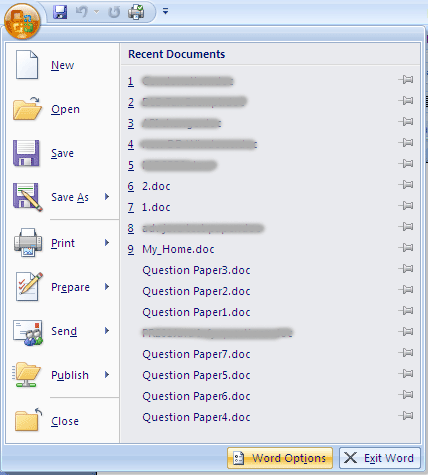
2. Select Word Options button at the bottom of the window.
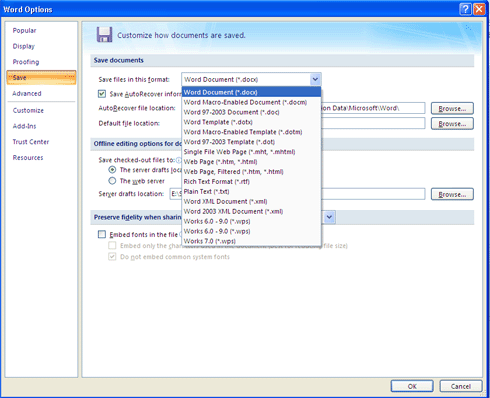
3. Select the Save option on the left hand corner and here you can set the default format (say .doc) and next time you click save button, the default format will be .doc.








I think Microsoft should not have changed the file extension at least. When Win95 was released everyone said “DOS is dead” and now “DOC….”
great tip nirmal, just 1query . Will all the new features still work perfectly ❓
yeah backward compatibility is important…
Gr8 tip nirmal. Most of my frnds are facing this problem.
@Vaibhav,
This is not a feature, I was just telling how to set the default format for it to read in other versions.
Nopes Nirmal, you got my query wrong. I just want to know if the new features that are added in office 07, will be used when saved in DOC format, as when converting a docx file in doc format, it shows that some features like smartart might not perform well… 🙁
Just wanted to know that nirmal 😀
@Vaibhav,
You are right, many of these features available in new versions are not supported by older ones, but they say that they will convert these features into nearest available ones. We need to check the compatibility before saving.
Great tip Nirmal. Many times i end up saving my files in docx format in a hurry and when i open it other’s computer having MS Office 2003, i realize my mistake.
I want to how to page Default colour set
In Ms office Word 2007