

In Microsoft Office, you can repeat your previous action performed using the F4 key on the keyboard. The computer remembers your previous action and this can be repeated using F4.
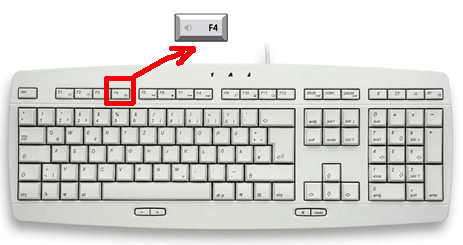
For example say you have drawn a table using the tools menu in word and you need to repeat the same table in another page or another word document. This time you need not got to the menu, just click on the place where you need to table and press F4, done you have the new table. Note that computer remembers the last action and in between you do any other action, it will repeat the last action.
This tip is helpful when you are doing lots of formating in Word or Excel sheets. Hope you enjoyed reading this tip.








yep that was a nice simple tip like the ctrl+Z to undo…
@Rajesh,
This is really useful if you are doing lot of formatting with Word or Excel.
nice find nirmal, even i was not aware of it, never ever heard of it before. But, it was not working flawlessly on office 07, some of the functions or commands were not responding, but mostly did. 😉
@Vaibhav,
I think some commands may not work in Office 2007, but will work in 2003. I have tested few and was successful.
awesome tips Nirmal!
Sweet and simple tips always help and this one will surely 🙂
Nice tip buddy! I think every application should have a shortcut ‘?’ that will show us all the other shortcuts! 😉
Great tip nirmal , I didnt know about this. I still wonder such kind of productive tips are still like a secret. I think microsoft should really do something to educate the users 🙂 😀
Nice tip Nirmal. I hardly know and use these shortcuts. Will try to remember it now
nice tip buddy, i use shortcuts but never knew this
I use it frequently for inserting or deleting rows in Excel whenever they are more time saving than traditional approach of selecting the number of row and inserting or deleting.
@Jalaj,
Good to see that some one is already using this tip. 🙂
Nice tip Nirmal. This is a real time-saver. 🙂
pretty cool Nirmal. never knew about it.
Cool find buddy. Stumbled to share the love. 😉
Good trip, but it doesn’t work in Office 07 🙁 , someone knows more?
In Excel 2003, I used to always use the F4 key to repeat a sort I had made in another worksheet. This repeat previous action function does not work when it comes to sorting in Excel 2007. Do you have any tips or tricks on how to get it to work? Do you know if this is how it was meant to be?
Cheryl – I haven’t checked, but by default the F4 function key in Excel is for absolute cell addressing – CTRL-Y is the repeat key in Excel – try that.
F4 key suddenly stopped working … I have tried replacing key board.. still doesnt work
This does not work in Word – i.e. when I resize a picture 50% I can’t use f4 on the next picture to scale the same amount