

If you are using Firefox for the first time and wanted to import all the browser setting from Internet Explorer or Opera, here is the simple step to do it.
Go to File-> Import.
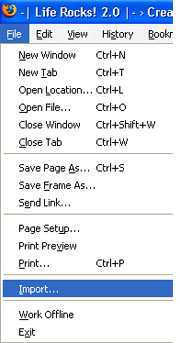
The import wizard is opened and you can select the browser from where you would like to import all the settings.
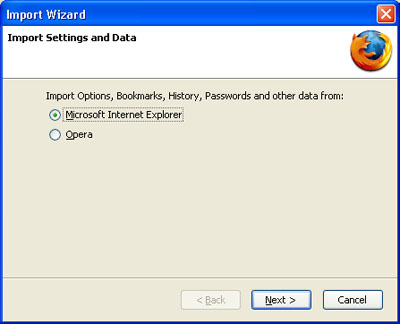
After selecting the browser, you need to select the items to import. By default all the items are selected. The items displayed will depend on the browser selected. The following items are available in IE.
- Internet Options
- Cookies
- Browsing History
- Saved Form History
- Saved Passwords
- Favorites
Once you have selected the items, click next and all the items will be imported to Firefox.





HMmm, pretty simple stuff, yet informative. 😎
Can’t imagine if without the import feature, how much time would have to be spent entering saved passwords and favorites.
Yeah, this is very important. I run 100s of account and cant even remember the autogenerated passwords of even 10 of them and in that way Firefox is very helpful and its Import feature much more! 😀
Firefox should open this wizard automatically each time it is started witha blank profile. I recommend just deleting the profile before you run it if you are going to do with an installed Firefox, so there aren’t too many times when you should need this I should think.
This is important because soon more and more people will use Firefox instead of IE.
As we all know, IE sucks
Very useful tip. I only wish it was so easy to import into IE7 or other browsers. I use Firefox as my primary browser, but I would like to update my bookmarks once a month with Opera, IE7, and Flock, as I use each of them on occasion.
Someone needs to make a browser sync that syncs your IE7, Opera, and Firefox bookmarks. I use Google Bookmarks so it isn’t a big deal, but it would be useful and I would use it.
Nice little reminder. I use it to sync up the bookmarks between work and home.
Never looked there in the file menu …although the firefox asks you to import setting during the install ..once i forgot that during install than i ve to reinstall firefox 😛 at that time this would have come handy thanks
@Shashank,
Yes, Firefox asks to import soon after installation. If you want to import anytime after that, this method will be useful. 🙂